Agentic AI for Developers: Architecture, RAG, MCP & Local LLMs
Build beyond simple chatbots. Learn how Agentic AI systems actually work—from agent architecture and ReAct loops to tool calling, MCP, memory, RAG, LangGraph, and local LLMs. This developer-focused guide explains the core concepts and shows how to build a practical AI agent in Python.
Agentic AI for Developers: Architecture, ReAct, Tool Calling, MCP, Memory, RAG, LangGraph, and Local LLMs
Large Language Models changed how developers build AI applications. But an LLM by itself is not an agent.
A model can generate code, explain a document, write SQL, or answer a question. It becomes much more useful when it can decide what to do, use external tools, observe their results, maintain state, and continue working toward a goal.
That is the foundation of Agentic AI.
For developers, the important question is not simply:
"Which LLM should I use?"
The better question is:
"How do I build a reliable system around an LLM that can reason, use tools, maintain state, retrieve information, and execute multi-step workflows?"
This article breaks down that architecture from first principles and builds a simple Python agent.
1. What Is an AI Agent?
An AI agent can be thought of as a control loop around an LLM.
At a high level:
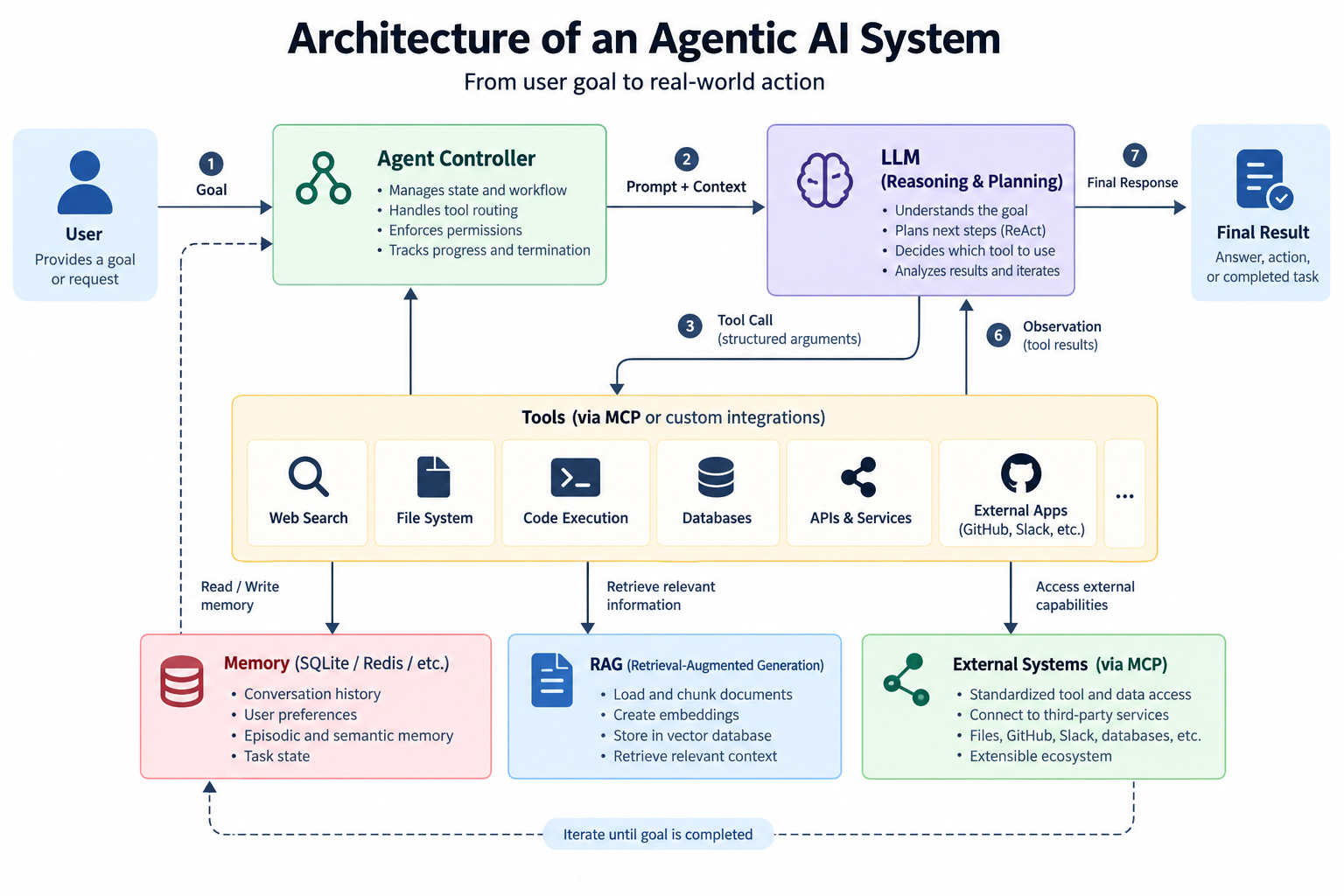
The core loop is:
Goal
 ↓
Reason
 ↓
Choose action
 ↓
Execute tool
 ↓
Observe result
 ↓
Reason again
 ↓
Repeat
The loop terminates when the agent determines that the objective has been completed or cannot be completed.
This is fundamentally different from a single LLM call:
response = llm("Explain quantum computing")
An agent instead performs something closer to:
User Goal
   ↓
LLM decides what information is required
   ↓
Search tool
   ↓
LLM analyzes results
   ↓
Database tool
   ↓
LLM evaluates database result
   ↓
Final response
The LLM is the reasoning component inside a larger software system.
2. Agent Architecture
A production agent usually consists of several layers.
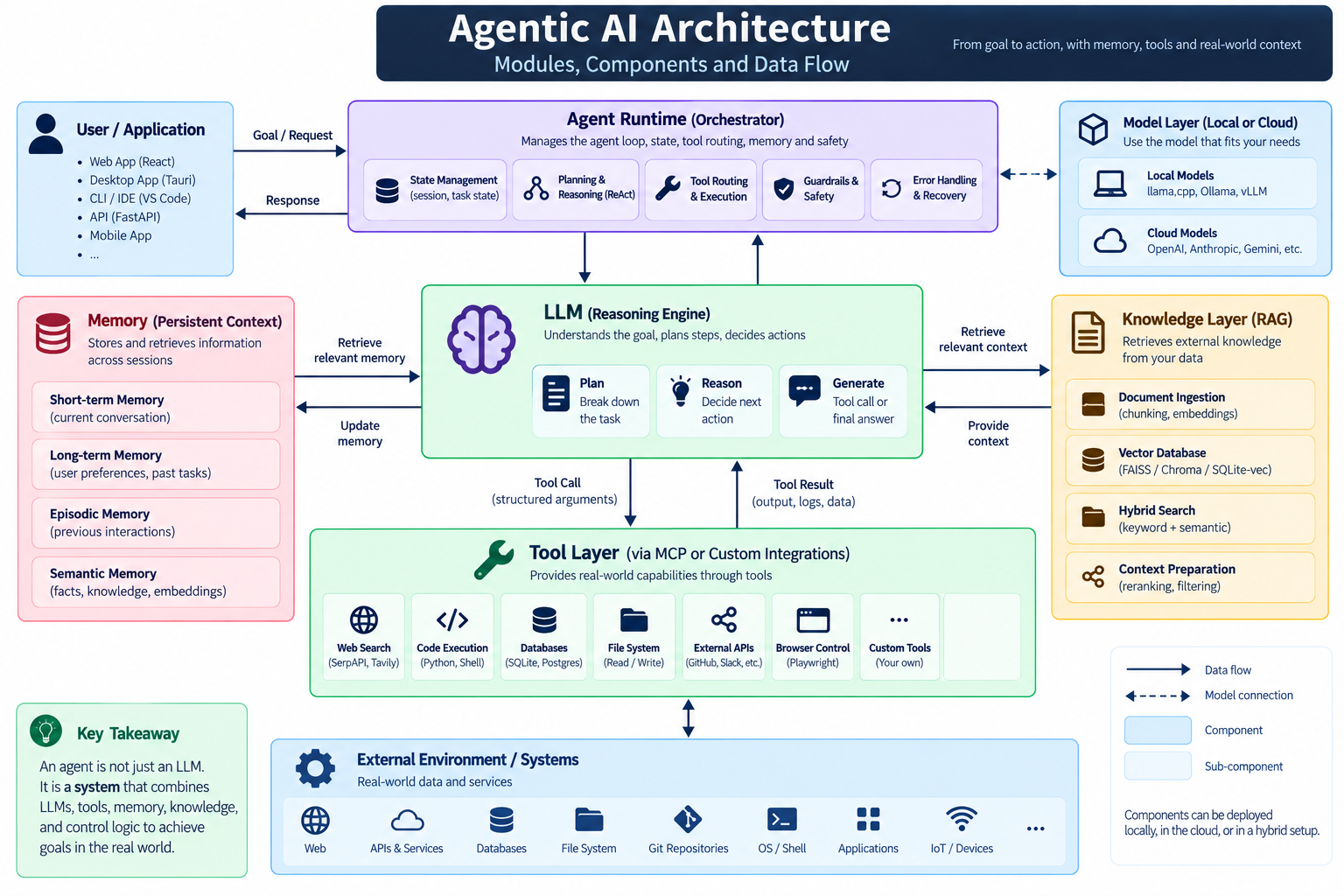
A useful mental model is:
LLM = brain
Tools = hands
Memory = persistent context
RAG = knowledge retrieval
Agent controller = nervous system
Guardrails = safety system
No individual component makes the system an agent. The behavior emerges from how these components interact.
3. ReAct: Reasoning + Acting
One influential approach to agent design is ReAct, short for Reasoning and Acting.
The basic idea is to alternate between reasoning and actions.
Conceptually:
Thought
  ↓
Action
  ↓
Observation
  ↓
Thought
  ↓
Action
  ↓
Observation
  ↓
Final Answer
Suppose a user asks:
"What is the current population of India?"
A simplified agent process could be:
Goal:
Find current population.

Reason:
This information may have changed.
I should retrieve current data.

Action:
Search("India current population")

Observation:
Search results returned.

Reason:
Evaluate the retrieved information.

Final:
Provide the answer with the relevant source.
The important idea is not exposing private chain-of-thought to users. In production systems, developers generally want structured intermediate state and tool traces, rather than dumping hidden reasoning.
For example:
{
  "status": "tool_call",
  "tool": "search",
  "arguments": {
    "query": "India current population"
  }
}
This is easier to log, inspect, evaluate, and secure.
4. Tool Calling
Tool calling is one of the most important building blocks of modern agents.
Instead of asking an LLM to directly execute an operation, the developer defines a structured tool.
For example:
def get_weather(city: str) -> dict:
    ...
The model receives the tool definition:
{
  "name": "get_weather",
  "description": "Get current weather for a city",
  "parameters": {
    "type": "object",
    "properties": {
      "city": {
        "type": "string"
      }
    },
    "required": ["city"]
  }
}
The LLM can then decide:
{
  "tool": "get_weather",
  "arguments": {
    "city": "Pune"
  }
}
Your application executes the function.
The result is returned to the model:
{
  "temperature": 29,
  "condition": "Cloudy"
}
The LLM can then generate the final response.
This creates a clean separation:
LLM
 ↓
Decision
 ↓
Structured Tool Call
 ↓
Application
 ↓
Tool Execution
 ↓
Result
 ↓
LLM
The model decides what should happen.
Your application decides whether and how it is allowed to happen.
That distinction is critical for security.
5. Why Tool Calling Is Better Than Giving the Model Raw Access
A poorly designed agent might allow an LLM to execute arbitrary shell commands.
That is dangerous.
A better design exposes narrowly scoped operations:
def read_project_file(path: str):
    ...

def run_tests():
    ...

def search_documentation(query: str):
    ...
Instead of:
def execute_anything(command: str):
    ...
This creates a permission boundary.
For example:
Agent
 │
 ├── read_file()
 ├── search_docs()
 ├── run_tests()
 └── create_patch()
rather than:
Agent
 │
 └── unrestricted_shell()
Agentic AI should follow the same security principles as conventional software:
least privilege, validation, authentication, authorization, logging, and isolation.
6. MCP: Model Context Protocol
As agents become more capable, another problem appears.
Every application wants to connect its LLM to different tools:
GitHub
Slack
Databases
Files
Google Drive
Search
Kubernetes
Cloud APIs
Without a common protocol, developers repeatedly build custom integrations.
Model Context Protocol (MCP) addresses this interoperability problem.
Conceptually:
             AI Application
                  │
                  │ MCP
                  ↓
        ┌──────────────────┐
        │    MCP Server    │
        └────────┬─────────┘
                 │
       ┌─────────┼─────────┐
       ↓         ↓         ↓
     Files     GitHub     DB
An MCP server exposes capabilities in a standardized way.
This means the agent application does not necessarily need a custom integration for every individual tool.
MCP is therefore better understood as a protocol for connecting AI applications with external context and capabilities, rather than as an agent framework itself.
That distinction matters.
MCP ≠ agent
MCP provides an interoperability layer.
The agent still needs logic for:
Planning
Tool selection
State
Memory
Error handling
Permissions
Workflow execution
7. Memory
LLMs are fundamentally stateless between requests unless the surrounding application provides state.
Consider:
User:
My preferred language is Python.

Later:

User:
Build the backend.
A stateless model may not know the user's preference.
An agent application can store it.
Memory can be divided into different categories.
Short-Term Memory
Information required during the current task:
Current conversation
Tool results
Intermediate state
Current plan
Long-Term Memory
Information persisted across sessions:
User preferences
Project information
Previous decisions
Saved facts
Episodic Memory
Records of previous interactions or experiences:
Project deployment failed because
environment variable DATABASE_URL was missing.
Semantic Memory
Structured knowledge:
Project:
Python + FastAPI

Database:
PostgreSQL

Frontend:
React
A simple architecture could be:
Agent
 │
 ├── Context
 │
 ├── Working Memory
 │
 └── Persistent Memory
          │
          ↓
       SQLite
For many personal assistants, SQLite is surprisingly useful. You do not need a distributed database just because your application contains AI.
8. RAG: Retrieval-Augmented Generation
An LLM does not automatically know your private documents.
Suppose you have:
company_policy.pdf
project_documentation.md
research_paper.pdf
database_schema.txt
You want the agent to answer questions using these documents.
RAG provides a solution.
The basic pipeline is:
Documents
   ↓
Chunking
   ↓
Embeddings
   ↓
Vector Database
   ↓
Similarity Search
   ↓
Relevant Context
   ↓
LLM
   ↓
Answer
For example, a document may be divided into chunks:
Document
 ├── Chunk 1
 ├── Chunk 2
 ├── Chunk 3
 └── Chunk 4
Each chunk is converted into an embedding vector.
When the user asks:
"What is our refund policy?"
the system searches for semantically relevant chunks.
The retrieved information is then provided to the LLM.
9. RAG and Agents Are Different
These concepts are frequently mixed together.
They solve different problems.
RAG answers:
"What information should the model retrieve?"
Agents answer:
"What actions should the system take to accomplish the goal?"
They can work together.
For example:
User:
Analyze our customer complaints and create a report.

Agent
 │
 ├── RAG → retrieve complaint data
 │
 ├── Python → calculate statistics
 │
 ├── LLM → interpret findings
 │
 ├── File tool → create report
 │
 └── Final response
RAG becomes one capability available to the agent.
10. LangGraph
As soon as an agent becomes more complex, a simple while-loop becomes difficult to maintain.
Consider a workflow:
Analyze request
      ↓
Retrieve documents
      ↓
Call API
      ↓
Validate result
      ↓
If invalid → retry
      ↓
Generate response
      ↓
Human approval
      ↓
Execute action
This is a graph.
LangGraph is designed around this type of stateful, graph-based agent workflow.
Conceptually:
             ┌─────────────┐
             │    START    │
             └──────┬──────┘
                    ↓
             ┌─────────────┐
             │    Agent    │
             └──────┬──────┘
                    ↓
              ┌─────┴─────┐
              │ Tool Call?│
              └─────┬─────┘
                Yes  │  No
                 ↓   └──────→ END
              ┌─────────┐
              │  Tool   │
              └────┬────┘
                   ↓
                Agent
The major advantage is explicit state and workflow control.
Instead of hiding everything inside an opaque agent loop, you can define:
State
Nodes
Edges
Conditions
Retries
Human approval
Persistence
This becomes particularly useful for production systems.
11. Building a Minimal Agent in Python
Let's build a deliberately simple agent without using a large framework.
The objective:
Given a mathematical question, decide whether to use a calculator tool and then return the result.
First, define a tool.
def calculator(expression: str) -> float:
    return eval(expression)
However, this implementation is unsafe for production because eval() can execute arbitrary Python expressions.
A production implementation should use a safe mathematical parser or restricted evaluation environment.
The conceptual architecture is more important here:
tools = {
    "calculator": calculator
}
The LLM receives the available tools.
A simplified agent loop could look like:
def run_agent(user_input, llm):

    messages = [
        {
            "role": "user",
            "content": user_input
        }
    ]

    while True:

        response = llm(
            messages=messages,
            tools=tools
        )

        if response.tool_call:

            tool_name = response.tool_call.name
            arguments = response.tool_call.arguments

            result = tools[tool_name](**arguments)

            messages.append({
                "role": "tool",
                "content": str(result)
            })

        else:
            return response.content
This tiny loop captures the fundamental idea behind many agent systems.
LLM
 ↓
Tool decision
 ↓
Tool execution
 ↓
Tool result
 ↓
LLM
Frameworks add much more functionality around this basic concept.
12. A Better Agent State
Real agents need more than messages.
A state object might contain:
from dataclasses import dataclass, field


@dataclass
class AgentState:
    messages: list = field(default_factory=list)
    task: str = ""
    observations: list = field(default_factory=list)
    memory: dict = field(default_factory=dict)
    iteration: int = 0
    status: str = "running"
Now the agent has explicit state.
For example:
state = AgentState(
    task="Analyze this dataset"
)
During execution:
state.iteration += 1
state.observations.append(tool_result)
This is much easier to debug than keeping everything hidden inside a prompt.
13. Adding RAG to the Agent
Suppose we have a function:
def retrieve(query: str) -> list[str]:
    ...
Now the agent can choose between retrieval and other tools.
                  User
                   ↓
                  LLM
             ┌─────┴─────┐
             ↓           ↓
          retrieve     calculator
             ↓           ↓
          results      result
             └─────┬─────┘
                   ↓
                  LLM
                   ↓
              Final Answer
This makes the agent a general-purpose controller over multiple capabilities.
14. Local LLMs
Cloud APIs are convenient, but they are not the only option.
Developers can run LLMs locally using technologies such as:
llama.cpp
Ollama
vLLM
Transformers
MLX on supported Apple hardware
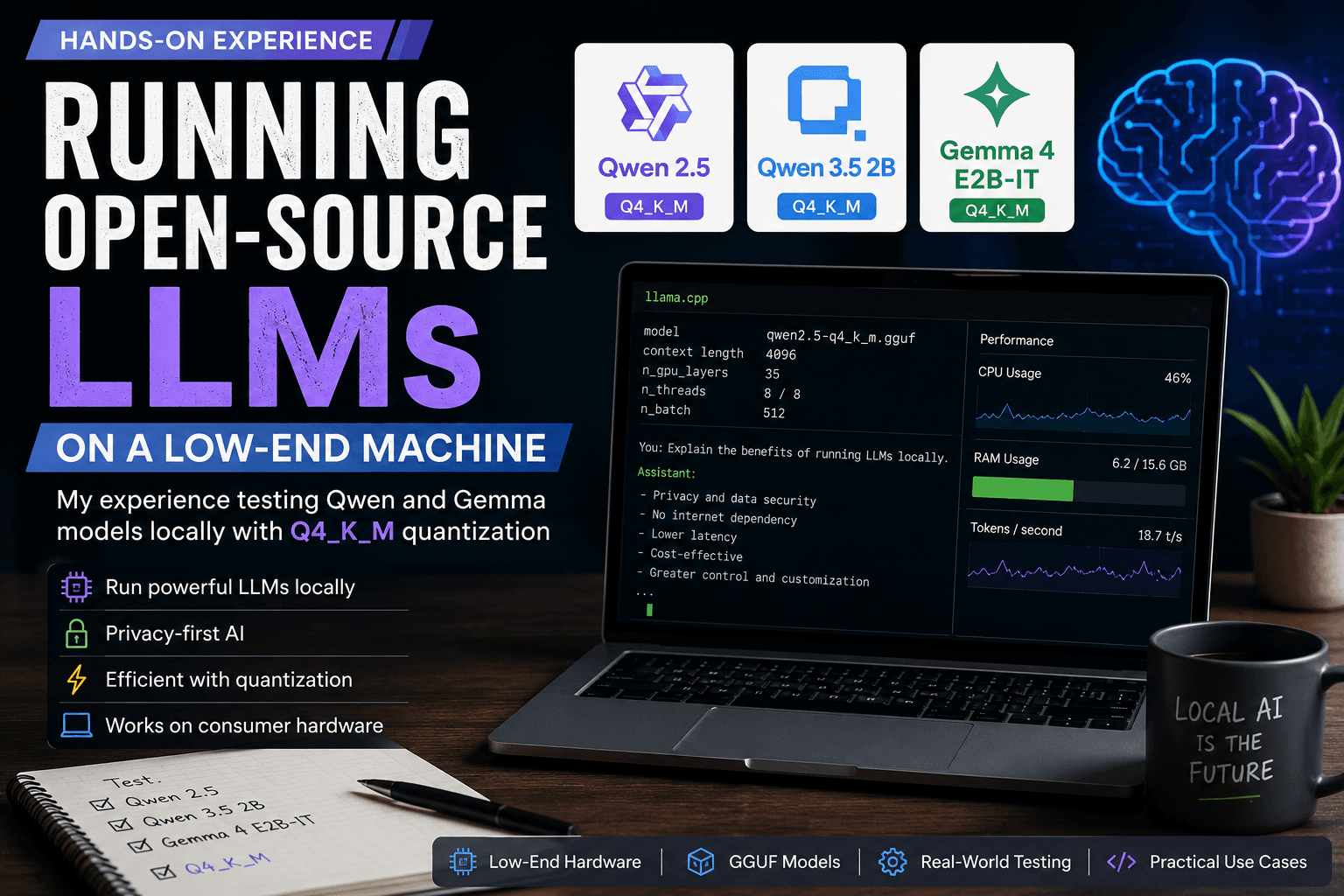
A local agent architecture might look like:
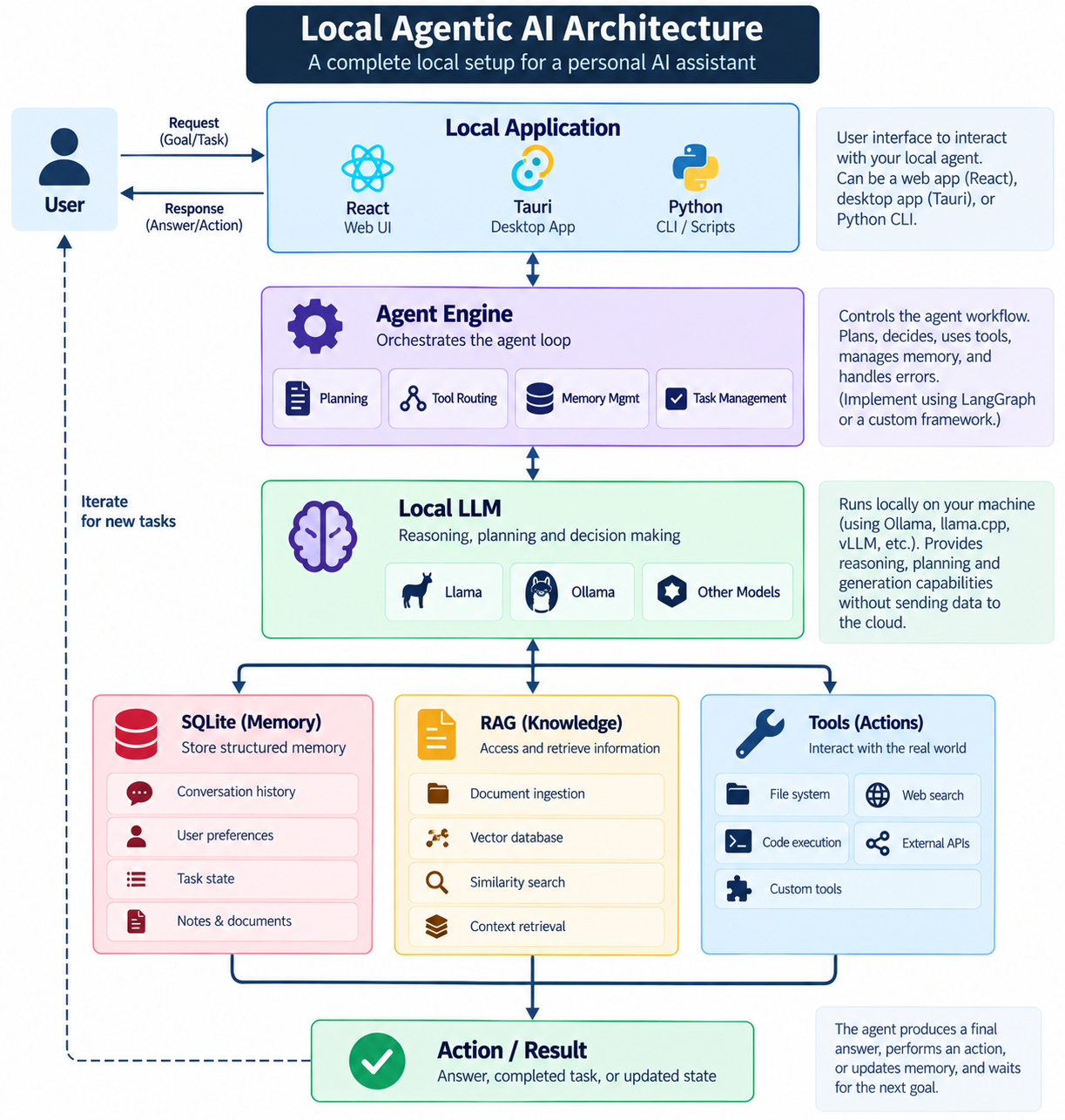
This architecture is particularly interesting for personal AI assistants.
The application can keep:
Conversation history
Personal notes
Preferences
Documents
Agent state
locally.
This can reduce dependence on external services and improve privacy.
However, local AI has real limitations.
Model quality depends heavily on:
Model size
Quantization
GPU VRAM
System RAM
Context length
Inference speed
Running a model locally does not automatically make it better. You trade infrastructure simplicity and potentially stronger model capabilities for control, privacy, and local execution.
15. Local Agent Example
Imagine a developer assistant running on your computer.
The user says:
"Check my project, find failing tests, fix them, and explain what you changed."
The agent could operate like this:
User Goal
   ↓
Agent
   ↓
List project files
   ↓
Inspect repository
   ↓
Run tests
   ↓
Read failures
   ↓
Identify likely cause
   ↓
Modify code
   ↓
Run tests again
   ↓
If failure → iterate
   ↓
All tests pass
   ↓
Explain changes
Tools might include:
tools = {
    "list_files": list_files,
    "read_file": read_file,
    "write_file": write_file,
    "run_tests": run_tests,
    "git_diff": git_diff
}
The agent does not need direct access to everything.
It receives explicit capabilities.
This is a much safer architecture.
16. Agent Guardrails
Autonomy without constraints is a bad engineering strategy.
Every tool should have boundaries.
For example:
ALLOWED_DIRECTORIES = [
    "./project"
]
A file-reading tool should reject:
../../secrets
/etc/passwd
~/.ssh/
Similarly, destructive actions should require approval.
For example:
Agent wants to:
Delete 143 files

             ↓

        HUMAN APPROVAL

        [Approve] [Reject]
This creates a human-in-the-loop architecture.
Not every action needs approval.
Reading a project file might be automatic.
Deleting a production database should absolutely not be.
17. Observability
Agent failures can be difficult to debug.
A normal function might fail like this:
function()
   ↓
exception
An agent can fail like this:
LLM decision
    ↓
Tool A
    ↓
Incorrect observation
    ↓
LLM decision
    ↓
Tool B
    ↓
Bad assumption
    ↓
Tool C
    ↓
Failure
Therefore, agent systems need good observability.
Log:
Task ID
Agent state
Model
Tool calls
Tool arguments
Tool results
Latency
Errors
Token usage
Final result
A useful trace might look like:
[12:01:03] Agent started
[12:01:04] Tool: search_docs
[12:01:05] Tool completed
[12:01:06] Tool: database_query
[12:01:06] Tool failed
[12:01:07] Agent retry
[12:01:08] Task completed
Without this information, debugging agentic systems becomes guesswork.
18. Agents Are Not Magic
There is a tendency to describe agents as autonomous digital employees.
That description is misleading.
An agent is still a probabilistic system operating inside software constraints.
It can:
Misunderstand requirements
Select the wrong tool
Retrieve irrelevant information
Produce incorrect code
Repeat actions
Fail to recover
Misinterpret tool output
Therefore, good agent engineering is largely about controlling failure modes.
A production-quality agent needs:
Reliable tools
      +
Explicit state
      +
Validation
      +
Observability
      +
Permission boundaries
      +
Recovery strategies
      +
Human oversight where necessary
Not just a bigger model.
19. The Practical Agent Stack
A modern agent application can be organized into layers:
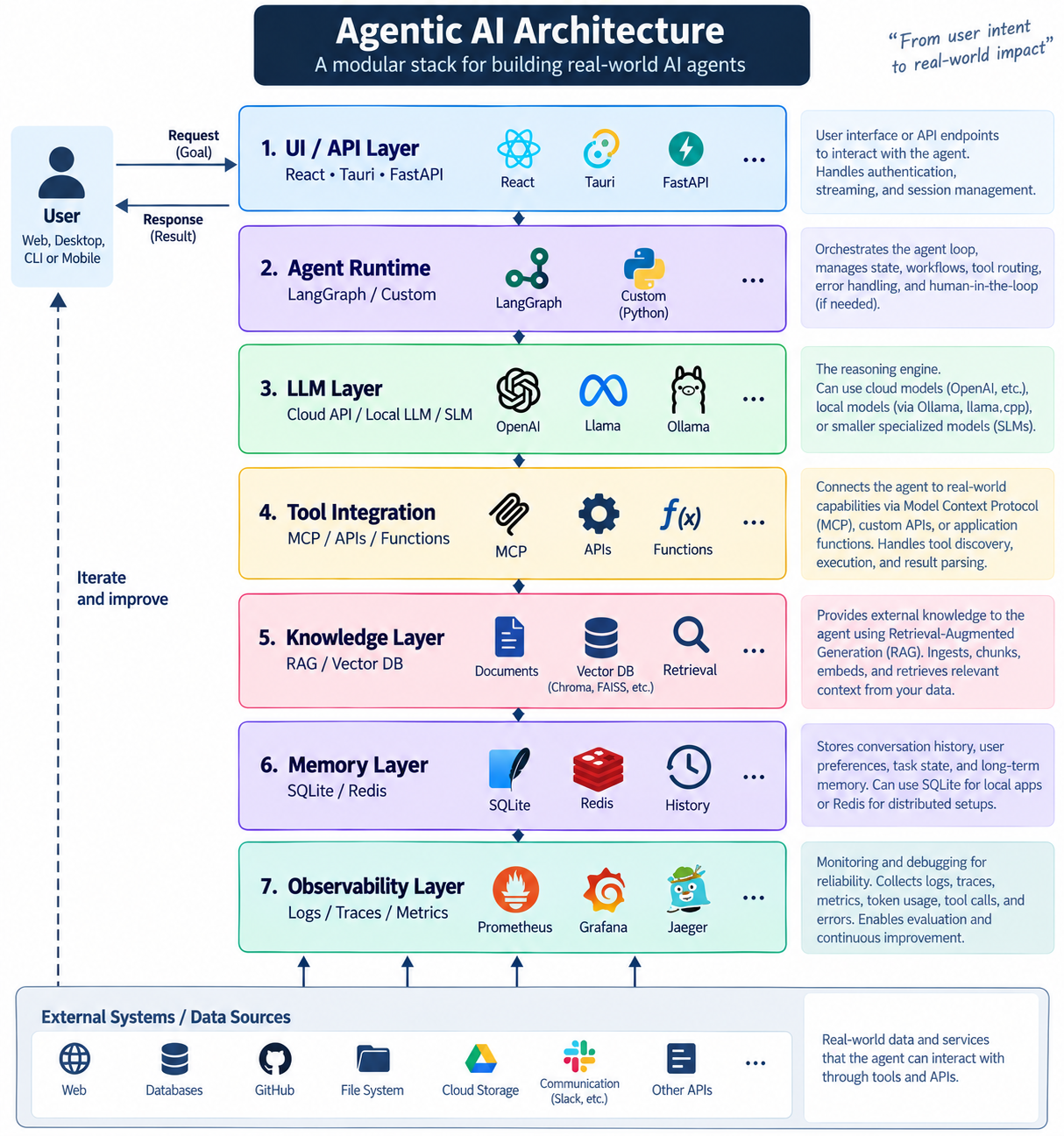
Not every application needs every layer.
A common mistake is building a complicated architecture before understanding the actual problem.
Start with:
LLM + one tool + state
Then add:
RAG
Memory
Multiple tools
Graph workflows
MCP
Human approval
only when the application actually needs them.
20. Agentic AI vs Traditional Automation
Traditional automation usually follows a predefined workflow:
Step 1
  ↓
Step 2
  ↓
Step 3
  ↓
Step 4
Agentic automation can dynamically choose its next step:
              ┌──→ Tool A
              │
Goal → Agent ─┼──→ Tool B
              │
              └──→ Tool C
                    ↓
                  Result
                    ↓
                  Agent
This flexibility is useful for ambiguous problems.
But deterministic automation is often better when the workflow is known.
If you know that:
Every day at 9 AM:
Fetch API
→ Transform data
→ Store database
→ Send report
you probably do not need an autonomous agent.
Use conventional automation.
Agents are valuable when the path to the solution cannot be completely specified in advance.
21. Where Agentic AI Is Actually Useful
Strong use cases include:
Coding Agents
Repository
→ Analyze
→ Modify
→ Test
→ Debug
Research Agents
Question
→ Search
→ Retrieve
→ Compare
→ Synthesize
Data Analysis Agents
Dataset
→ Inspect
→ Analyze
→ Generate code
→ Execute
→ Explain
Personal Assistants
Goal
→ Retrieve memory
→ Plan
→ Use tools
→ Execute
Business Operations
Request
→ Retrieve company data
→ Validate
→ Execute workflow
→ Report result
22. The Future: Agentic Systems, Not Just Agents
The most important shift is that the future probably will not be about a single giant autonomous agent.
Instead, applications will increasingly become agentic systems.
The application itself will contain:
Models
+
Tools
+
Memory
+
Retrieval
+
State
+
Workflows
+
Permissions
+
Evaluation
The LLM becomes one component of the architecture rather than the entire application.
That is the mindset developers should adopt.
Conclusion
Agentic AI is not simply "an LLM that can think."
It is a software architecture in which an AI model can participate in a controlled loop of:
Observe → Reason → Act → Observe → Adapt
Tool calling gives the model capabilities.
MCP provides a standardized way to connect AI applications with external tools and context.
RAG gives agents access to external knowledge.
Memory provides persistence.
LangGraph and similar orchestration systems provide explicit stateful workflows.
Local LLM runtimes make it possible to build private, locally controlled agents.
But none of these technologies magically solves reliability.
The hard engineering problem is building an agent that can act correctly, recover from failure, remain observable, respect permissions, and know when it should stop.
That is where agentic AI moves from an impressive demo to actual software engineering.
The future of AI applications will not simply be about asking increasingly powerful models questions.
It will be about building systems where models can use software, access information, execute workflows, and collaborate with humans—reliably.